
VPS reseller hosting gives your agency its own virtual private server, with WHM and cPanel, to host client websites under your brand. Unlike shared reseller hosting, where many resellers split one server, your CPU, memory and IP reputation belong to you alone. For agencies with a growing client list, that isolation usually means faster sites, fewer surprises and a lower cost per client.
Key takeaways
- Shared reseller servers put your clients next to other resellers’ clients, so one busy or compromised site can slow down or blacklist everyone.
- A private VPS gives you allocated vCPU and RAM, your own server, and root access for migrations and custom settings.
- Shared reseller hosting is still a fair choice for a few small, low-traffic sites.
- Once you fill a plan, the per-client cost on a VPS can drop below $2 a month.

Shared Reseller Hosting vs VPS Reseller Hosting
Both options give you WHM to create client cPanel accounts and bill clients under your own brand. The difference is what sits underneath. If you are new to the model, start with our primer on what reseller hosting is and how it works.
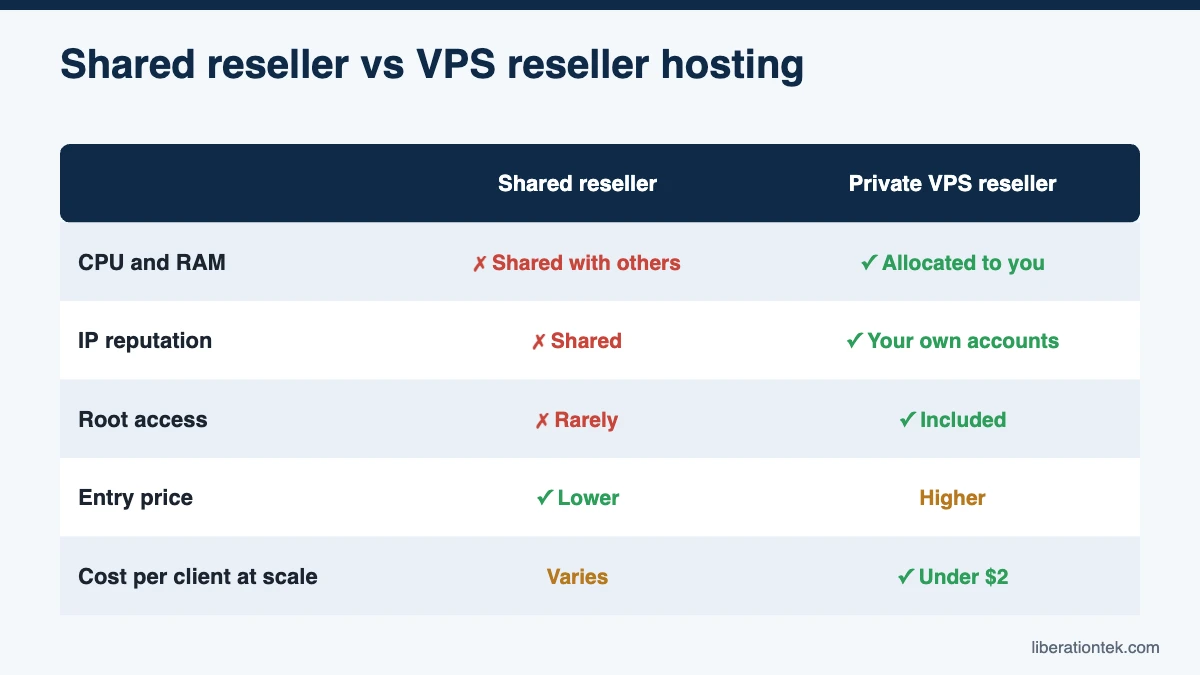
With shared reseller hosting, the host carves one physical server into many reseller accounts. You get a slice of disk space and bandwidth, but CPU, memory, IP addresses and server software are shared with every other reseller on the box. You typically do not get root access.
With reseller hosting on a VPS, you get your own virtual server with dedicated allocations of vCPU and RAM. WHM runs on your server, every account on it is yours, and on most plans you can log in as root.
Big-box hosts often offer both. InMotion Hosting’s cPanel reseller page says resellers “can host customer sites on Shared Reseller Hosting servers, cPanel VPS servers, and cPanel Dedicated Servers” (as of September 2026). The entry-level plans are usually the shared ones.
| Factor | Shared reseller hosting | Private VPS reseller |
|---|---|---|
| CPU and RAM | Shared with other resellers | Allocated to your server |
| IP reputation | Shared with unknown senders | Tied to your own accounts |
| Root access | Rarely | Usually included |
| Isolation | Account-level only | Server-level |
| Entry price | Lower | Higher |
| Cost per client at scale | Varies by plan | Drops as you add accounts |
| Best for | A few small sites | Growing agencies and MSPs |
The Noisy Neighbor Problem
On a shared server, your clients compete for CPU and memory with sites you have never seen. When another reseller’s client runs a heavy import, gets a traffic spike or is hit by a bot swarm, everyone on the server can feel it. Your client’s WooCommerce checkout slows down, and they call you, not the other reseller.
You cannot fix that problem from inside WHM because the cause is not on your accounts. You can only open a ticket and wait.
On a private VPS, the only neighbors your clients have are your other clients. If a site starts eating resources, you can see which one it is, talk to that client, and decide whether they need a bigger package or a move to their own server. Troubleshooting becomes a business conversation instead of a guessing game.
Shared IP Reputation and Blacklisting
Every server sends email, even if you never create a single mailbox. Contact forms, WooCommerce receipts, password resets and plugin alerts all leave from the web server’s IP address. Google’s email sender guidelines put it plainly: “The activity of any senders using a shared IP address affects the reputation of all senders for that shared IP address.”
On a shared reseller server, one compromised WordPress site sending spam can land the whole IP on a blocklist. Suddenly your clients’ order confirmations go to spam, and you had nothing to do with it.
A private VPS typically has its own IP address, so its reputation reflects the sites you host and the security you maintain. For client mailboxes themselves, keep them off the web server entirely. We recommend Liberation Mail private business email, which starts at $1.95 a month per mailbox and can be resold to each client under your service.
Resource Guarantees and NVMe Performance
Shared reseller plans usually advertise disk space and bandwidth, but rarely a guaranteed share of CPU or RAM. A private VPS reseller plan lists those numbers up front, so you can plan capacity the way you would for any other business asset.
Storage type matters too. NVMe drives connect over PCIe rather than older SATA interfaces, which helps database-heavy sites like WordPress and WooCommerce load and respond faster. Every Liberation reseller plan runs on NVMe storage:
- Launch: 2 vCPU, 4 GB RAM, 100 GB NVMe, 2 TB bandwidth
- Studio: 4 vCPU, 8 GB RAM, 200 GB NVMe, 4 TB bandwidth
- Agency: 6 vCPU, 12 GB RAM, 300 GB NVMe, 6 TB bandwidth
- Agency Plus: 8 vCPU, 16 GB RAM, 400 GB NVMe, 8 TB bandwidth
- Scale: 10 vCPU, 20 GB RAM, 500 GB NVMe, 10 TB bandwidth
Storage and bandwidth are shared across all the client cPanel accounts on your plan, so you decide how to divide them with WHM packages.
Root Access and Isolation
Root access is the difference between renting a room and having the keys to the building. With root on your own VPS, you can adjust server-wide PHP settings, install tools your stack needs, and run bulk migrations. The WHM Transfer Tool, for example, is documented by cPanel for users who “have root access or privileges with the sudo or su commands.”
Isolation also protects you on the security side. On a shared server, a vulnerability in someone else’s account is a risk you cannot patch. On your own VPS, the attack surface is limited to your clients, and your security practices decide the outcome. Our guide to reseller hosting security covers how to lock down client accounts.
Root access does not have to mean more work. On a fully managed VPS, the host still handles operating system and kernel patching, so you use root when you want it, not because you have to.
When Shared Reseller Hosting Is Fine
A private VPS is not the right answer for everyone. Shared reseller hosting can make sense if:
- You host three or four small brochure sites with light traffic.
- You are testing whether clients will pay you for hosting at all.
- Your budget is tight and the lowest monthly bill matters more than cost per client.
- None of your sites handle ecommerce, memberships or heavy form traffic.
If that describes you, a reputable shared reseller plan is a reasonable starting point. Just read the renewal terms, because many entry prices are introductory. When your client list grows or a client’s revenue starts depending on their site, it is time to move up.
Cost per Client Account on a Private VPS
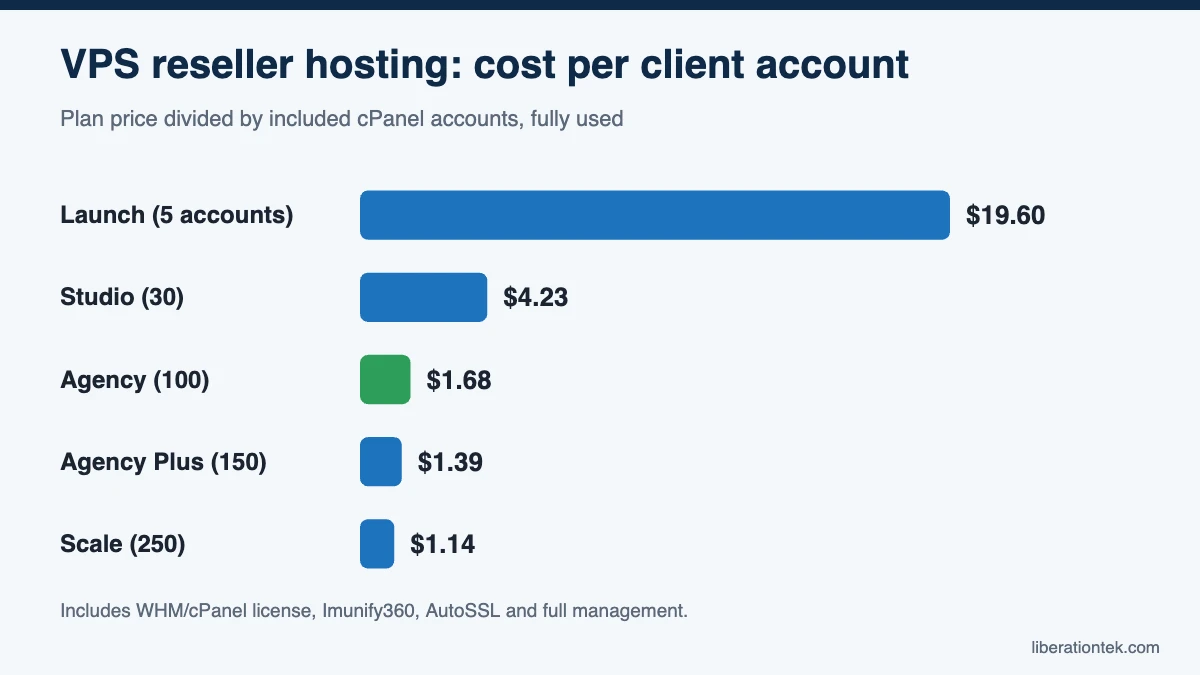
The monthly price of a private VPS reseller plan looks higher than an entry-level shared plan, but agencies should compare cost per client account. Here is the math on Liberation plans, assuming you fill every account:
| Plan | Monthly price | cPanel accounts | Cost per account |
|---|---|---|---|
| Launch | $98 | 5 | $19.60 |
| Studio | $127 | 30 | about $4.23 |
| Agency | $168 | 100 | $1.68 |
| Agency Plus | $208 | 150 | about $1.39 |
| Scale | $286 | 250 | about $1.14 |
Those prices include the WHM and cPanel license, Imunify360 on every client account, free AutoSSL and fully managed patching. For context, cPanel’s own pricing page lists the Premier license at $69.99 a month for up to 100 accounts, before any server or security software. Studio and higher plans also include daily backups with 7-day retention. On Launch, backups are an add-on through CodeGuard website backup.
If you charge clients even $20 to $30 a month, a full Agency plan leaves wide margins for support and maintenance work. Our guide on how much to charge for web hosting covers pricing tiers in detail.
VPS Reseller Hosting Checklist
Before you sign up with any provider, confirm these points in writing:
- Is it a private VPS or a shared server? Look for plain wording, not vague “cloud reseller” labels.
- What vCPU and RAM are allocated? Numbers you can plan around, not “unlimited.”
- Is the cPanel license included, and which tier? Premier is required for full custom branding.
- Is it fully managed? Who patches the OS and kernel, and who answers at 2 a.m.?
- What security runs on client accounts? A firewall, WAF and malware scanning should be standard.
- What happens at renewal? Ask for the renewal price, not just the intro rate.
- Who owns the client relationship? Make sure the host will not market to or bill your clients.
- Are migrations free? Moving 30 or 100 sites by hand is weeks of work.
How Liberation’s Private VPS Reseller Plans Work
Every Liberation reseller plan runs on your own private VPS on servers we own and operate in the United States. It is never a shared server. Each plan includes root and SSH access, full management, Imunify360 on every client account, white-label private nameservers and your own server hostname, and a domain reseller account. Agency, Agency Plus and Scale add full cPanel branding with your logo and colors.
Renewals are price-locked at your signup price, and any increase is capped at 5% with notice before renewal. We migrate client sites from other cPanel hosts free, up to your plan’s account limit. We never market to, solicit or bill your clients, and we act on an account only for unlawful use under U.S. law or non-payment, with 15 days’ written notice to you except in urgent legal or security cases. Support is 24/7 and U.S.-based, backed by a 99.9% uptime SLA and a 30-day money-back guarantee. See every plan, spec and included feature on our white-label reseller hosting page.
Frequently Asked Questions
What is the difference between VPS reseller hosting and shared reseller hosting?
Shared reseller hosting puts your reseller account on a server used by other resellers and their clients, so CPU, memory and IP addresses are shared. A VPS reseller plan gives you your own virtual private server with allocated resources, WHM and cPanel, and usually root access. Your clients’ performance and reputation then depend on your accounts, not a stranger’s.
Do I need root access for reseller hosting?
Not to create and manage client accounts, since WHM handles that. Root access matters when you want to change server-wide settings, install software, or use tools like the WHM Transfer Tool, which cPanel documents as requiring root. On a managed private VPS, you get root when you want it while the host still handles patching and monitoring.
How many client sites can a reseller VPS handle?
It depends on the plan’s cPanel account limit and on how busy the sites are. Liberation plans range from 5 accounts on Launch to 250 on Scale, with vCPU, RAM and NVMe storage that grow with each tier. Storage and bandwidth are shared across all client accounts on a plan, and you can upgrade anytime without handling the move yourself.
Is VPS reseller hosting worth the higher price?
For agencies with more than a handful of clients, usually yes. The monthly price is higher than entry-level shared reseller plans, but the cost per client account falls as you fill the server. On Liberation’s Agency plan, 100 accounts for $168 a month works out to $1.68 per account, with cPanel, Imunify360 and daily backups included.
Conclusion: Is VPS Reseller Hosting Right for Your Agency?
If you host more than a few client sites, VPS reseller hosting gives you what shared reseller servers cannot: your own resources, your own IP reputation, root access and a lower cost per client as you grow. Shared reseller hosting still has a place for very small portfolios, but agencies that want predictable performance and margins usually outgrow it fast.
Ready to move your clients onto a server that is fully yours? Compare Liberation’s private VPS reseller plans, or ask our team which plan fits your client list.
Related reading
- What Is Reseller Hosting? A Plain Guide for Web Designers
- How to Start a Web Hosting Business in 2026: 10 Steps
- How Much to Charge for Web Hosting: 2026 Pricing Guide
- WordPress Hosting — What you are reselling, and how it is priced.
- SSL Certificates — Auto-installed and auto-renewed on client sites.